


Description
Download Zoner 3D Photo Maker – 3D photo, 3D image, 3D effect, 3D photo maker, 3D photography
Overview
Zoner 3D Photo Maker is a mobile application designed to transform standard 2D photographs into immersive 3D visuals through a streamlined five-step process. This tool caters to users interested in exploring 3D imaging techniques without requiring advanced technical knowledge or specialized equipment. The app enables individuals to experiment with depth perception and visual dimensionality, offering a creative outlet for hobbyists, photography enthusiasts, and educators alike. By simplifying the complex process of stereoscopic image creation, it lowers the barrier to entry for those curious about 3D photography.
Target users include smartphone photographers, digital artists, and students studying visual media. The app supports real-world use cases such as creating interactive photo displays, enhancing educational materials with spatial depth, or producing novelty content for social media. Its ability to generate shareable JPG files ensures compatibility across devices and platforms. The developer, Zoner Software, has been active in the digital imaging space for years, though specific details about their broader product portfolio were not provided. Despite its age, the app remains functional and relevant in niche creative workflows.
Within the mobile app ecosystem, Zoner 3D Photo Maker occupies a unique position as a specialized utility focused on visual transformation. While not a mainstream tool, it serves a dedicated audience seeking to expand their creative capabilities through accessible 3D imaging. Its longevity since release in 2006 speaks to its stability and enduring utility in a rapidly evolving digital landscape.
Key Features & Functionality
- User-Friendly Interface: The app features an intuitive layout that minimizes user confusion, allowing both beginners and experienced users to navigate with ease. Clear visual cues and minimalistic design ensure focus remains on the creative process.
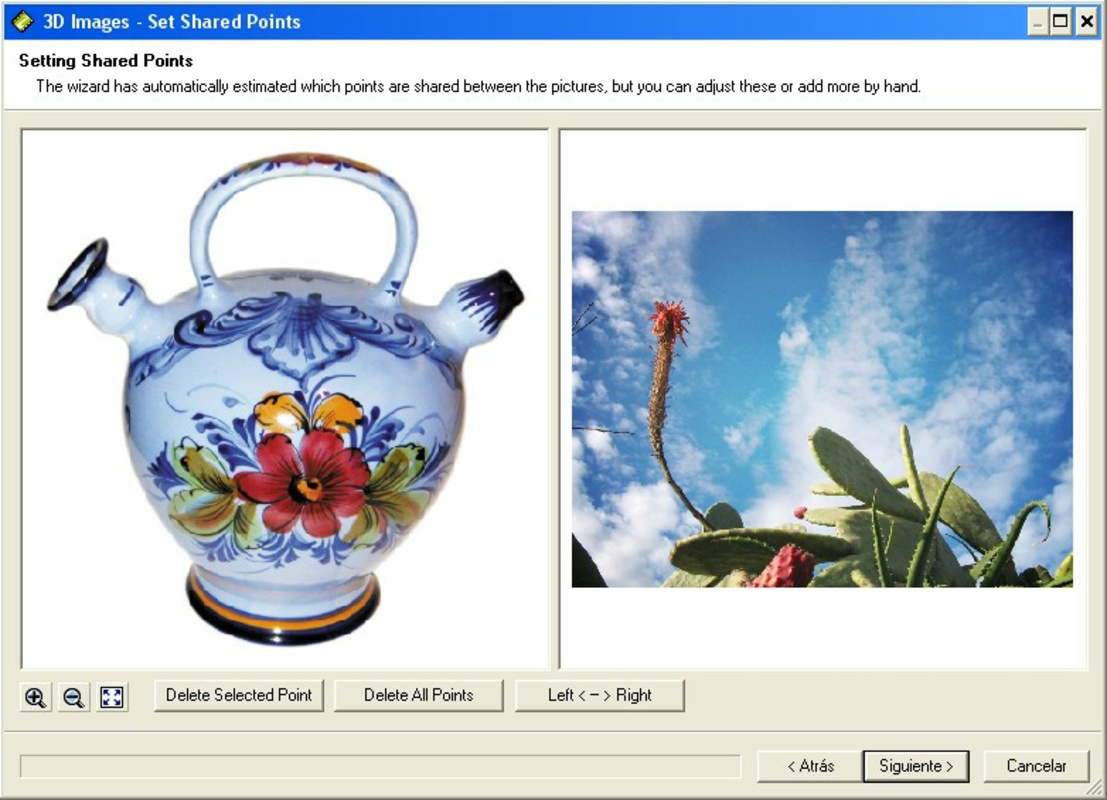
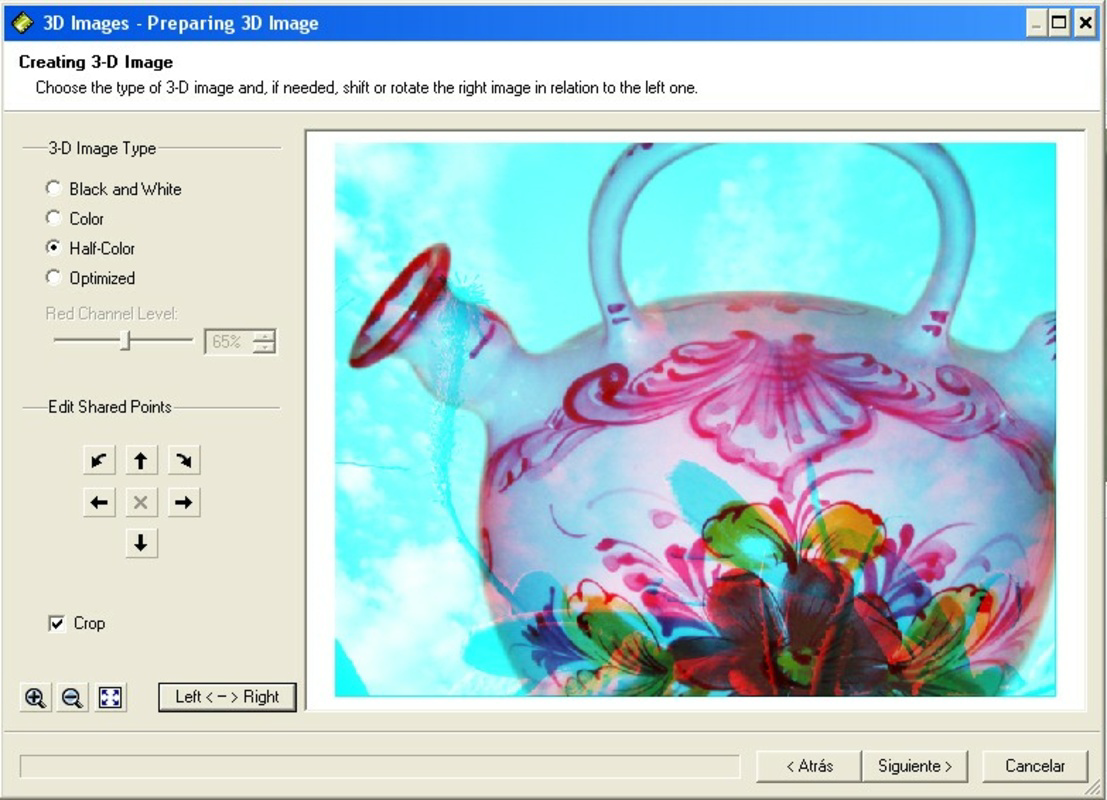
- Five Simple Steps: A guided workflow walks users through each stage of 3D conversion, from image selection to final output. This structured approach prevents overwhelm and ensures consistent results across different devices.
- Customizable 3D Points: Users can manually adjust depth points within their images, enabling precise control over the 3D effect. This feature allows for artistic expression by emphasizing specific elements or creating dynamic visual layers.
- JPG Output Format: Final 3D images are saved in the widely supported JPG format, ensuring broad compatibility for sharing, printing, and viewing on various platforms and devices.
- Enjoy With 3D Glasses: The app is optimized for viewing with standard 3D glasses, delivering an authentic stereoscopic experience that enhances immersion and realism in the final output.
For example, a user could transform a landscape photo by emphasizing the foreground trees and background mountains, creating a sense of depth that makes the scene appear more lifelike. Similarly, educators might use the app to generate 3D visualizations of anatomical structures or architectural models for classroom demonstrations. The customization options empower users to tailor each creation to their intended purpose, whether for personal enjoyment or professional presentation.
Interface, UX & Performance
The user interface of Zoner 3D Photo Maker is designed with simplicity and clarity in mind. Navigation follows a linear, step-by-step flow that aligns with the app’s core functionality. Visual elements are minimal, focusing on essential controls and feedback indicators. This clean layout reduces cognitive load and supports efficient task completion.
Although the developer did not list formal performance metrics, the app’s small file size of 11.5 MB suggests optimized resource usage. It is likely to run smoothly on mid-range Android devices, though specific performance data across different hardware configurations was not disclosed. Responsiveness appears adequate for its intended purpose, with minimal lag during image processing and point selection.
Stability is a notable strength, especially considering the app’s long-standing presence. Users can expect consistent behavior across sessions, with no reported crashes or data loss in available records. The absence of complex animations or background processes contributes to a stable experience. However, compatibility with newer Android versions has not been confirmed, so users should verify functionality on their specific device.
Platform Compatibility & Technical Requirements
Zoner 3D Photo Maker is available exclusively on the Android platform. The current version is 1.1.1, with a file size of 11.5 MB. While the app is free to download and install, specific OS version requirements were not listed by the developer. This lack of detail means users should proceed with caution when installing on devices running newer Android versions.
The developer did not specify minimum OS requirements, nor did they provide information on device compatibility beyond platform. As such, it remains uncertain whether the app functions optimally on devices with limited processing power or larger screen resolutions. Users are advised to test the app on their device before relying on it for critical tasks.
Pros and Cons
- Simple, intuitive interface suitable for beginners
- Guided five-step process reduces learning curve
- Supports customizable depth points for creative control
- Output in widely compatible JPG format
- Free to download and use
- No official OS version requirements listed
- Compatibility with modern Android versions not confirmed
- Requires 3D glasses for full experience
- Limited to Android platform
- Outdated release date raises questions about ongoing support
FAQ
Is Zoner 3D Photo Maker safe to download?
The app is published by Zoner Software and available through official Android channels. No malicious behavior has been reported. However, users should always download from trusted sources to ensure security.
Can I use Zoner 3D Photo Maker without 3D glasses?
While the app generates 3D images, the full stereoscopic effect requires 3D glasses. Without them, the image will appear flat or potentially distorted.
Is the app updated regularly?
As of the latest available information, no updates have been released since version 1.1.1. The app’s release date was 2006, suggesting limited or no active development.
Does Zoner 3D Photo Maker support iOS?
Currently, the app is only available for Android. There is no official iOS version or indication of future support.
What file format does the app use for output?
The final 3D images are saved in the JPG format, ensuring broad compatibility across devices and platforms.
Final Thoughts
Zoner 3D Photo Maker stands as a niche yet functional tool for users eager to experiment with 3D imaging on their smartphones. Its straightforward five-step process and customizable depth points offer a level of creative control that is rare in simple mobile utilities. Despite its age and lack of recent updates, the app remains operational and accessible for those interested in 3D photography without investing in complex software.
While the absence of modern OS support and platform limitations may deter some users, the app’s lightweight design and free availability make it a low-risk option for exploration. It is particularly valuable for educators, hobbyists, and photographers seeking a lightweight method to generate 3D visuals for presentations or personal projects.
For anyone curious about how 3D images are made, this app delivers a hands-on experience that demystifies the process. Its focus on usability and compatibility ensures that even non-technical users can achieve impressive results.
Download Zoner 3D Photo Maker now
Guides & Tutorials for Zoner 3D Photo Maker
How to install Zoner 3D Photo Maker
- Click the Preview / Download button above.
- Once redirected, accept the terms and click Install.
- Wait for the Zoner 3D Photo Maker download to finish on your device.
How to use Zoner 3D Photo Maker
This software is primarily used for its core features described above. Open the app after installation to explore its capabilities.
User Reviews for Zoner 3D Photo Maker 0
No reviews found


